We see more teams adopting Polars for new work, often coming from pandas.1 Check Technologies migrated more than 100 Airflow DAGs from pandas to Polars in under two weeks and saved 25% on its cloud bill, and Rabobank rebuilt a core part of its codebase on it, improving performance by 30x and enabling previously infeasible functionality in its prediction engine. The ecosystem is following: more and more libraries now work with Polars natively. This makes Polars a modern default for DataFrame work in Python.
This doesn’t automatically mean you should rewrite everything you already have. Some pipelines are well tested, rarely change, and have no reliability, memory, or cost problem. Others depend on a custom library with no Polars path yet, or sit under strict change control, where re-running the qualification tests costs more hours than the translation itself. This post is aimed at the pipelines that should be migrated. What’s left to decide is how much of it to take on at once, and whether to translate by hand or with an LLM.

One segment gives the biggest gain for the least effort
Most ETL pipelines can be broken down into segments, each applying a set of transformations to the data flowing through them. Some of those segments are more performance-sensitive than others, which makes them valid candidates for migration.
A quantifiable problem determines which segment to migrate
Pick a segment with a problem you can quantify, such as a job that runs out of memory or needs a machine that has grown expensive. Capture its input and output: the DataFrame it receives and the DataFrame it hands off. That same pair also becomes the fixture the migrated segment gets checked against. Everything between those two checkpoints can then be translated and optimized on its own, without touching the rest of the pipeline.
Measure before you move it
It helps to know whether the change actually made the job faster or more reliable. Measure wall time and peak memory before migrating the segment, then again after.
You can use tooling like hyperfine or time.perf_counter() for wall time, /usr/bin/time -l (macOS) or -v (Linux) for peak memory, and py-spy to see CPU utilization and profile code without changing the process.
Polars evaluates queries lazily and executes them in parallel, which for most workloads means lower wall time and lower peak memory than the equivalent pandas code (see our benchmarks).
The segment needs one conversion on each side
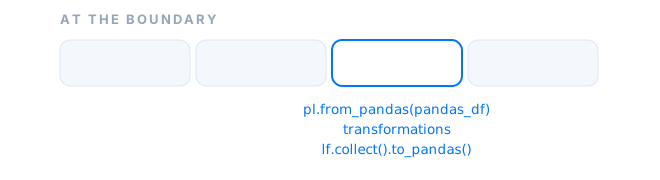
The boundary is where data crosses libraries.
Convert the input to a Polars DataFrame, switch to the Lazy API with lazy(), build your query, and return to pandas only if the next segment needs it.
import polars as pl

pandas_df = load_data()

def step_1(pandas_df): ...   # pandas

def step_2(pandas_df):       # the migrated segment
    polars_lf = pl.from_pandas(pandas_df).lazy()
    query = polars_lf.filter(...).group_by(...).agg(...)
    return query.collect().to_pandas(use_pyarrow_extension_array=True)

def step_3(pandas_df): ...   # pandas

pandas_df = step_1(pandas_df)
pandas_df = step_2(pandas_df)      # pandas in, Polars work, pandas out
pandas_df = step_3(pandas_df)
Conversion is usually zero-copy, not always
Polars uses Apache Arrow for its memory layout, and pandas can use either NumPy or Arrow.
Arrow is a shared memory layout, so when both sides use it the boundary conversion is usually free: the two libraries read the same buffers instead of copying them.
You should provide use_pyarrow_extension_array=True to to_pandas() to ensure pandas’ Arrow backend is used.
However, this isn’t always an option.
Depending on your schema and pandas setup, the conversion by to_pandas() might lead to a (partial) copy.
A copy means the column lives on both sides at once, so measure wall time and peak memory on your own frames rather than assuming the boundary is free.
- Upside: quick to try, fully reversible, and touches nothing outside the segment.
- Downside: the pipeline now runs two frameworks side by side. The boundary conversion is cheap for most dtypes but not free for all of them, and the optimizer can’t see across the boundary into the pandas code on either side.
- Recommended when: you want a fast, low-risk performance win on legacy code without committing to migrating everything around it.
One lazy plan across the pipeline gives the best performance
With every segment in Polars you get one lazy plan the optimizer can see from end to end. Getting here is best done by translating pipeline segments as described in the previous section, one segment at a time, until no pandas is left. The semantics to watch for and the verification below apply whether a person or a model does the translating.
Translation errors come from semantics, not syntax
Some examples: Polars has no index, NaN and null are different kinds of missing value, and details like datetime units, timezone handling, and row order can change without the code looking wrong.
The user guide’s coming from pandas page has a more exhaustive list.
Verify against the old output
A good way to translate a step is to write down the intended behavior first, then compare against it. Don’t treat the old pandas output as exact ground truth: it may impose a sort order that doesn’t matter, carry a null-handling quirk, or contain an old bug you don’t want to reproduce.
A good tool to make that comparison is assert_frame_equal.
By tweaking its keyword arguments, you can start strict and relax one keyword at a time:
from polars.testing import assert_frame_equal

assert_frame_equal(
    actual,
    expected,
    check_row_order=False,  # only if the segment defines no row order
    check_dtypes=False,     # only if the schema difference is intentional
    rel_tol=0,              # rel_tol defaults to 1e-5 and dominates abs_tol at large magnitudes
    abs_tol=1e-6,           # only for a defined absolute floating-point tolerance
)
Verified neighboring segments need no conversion between them
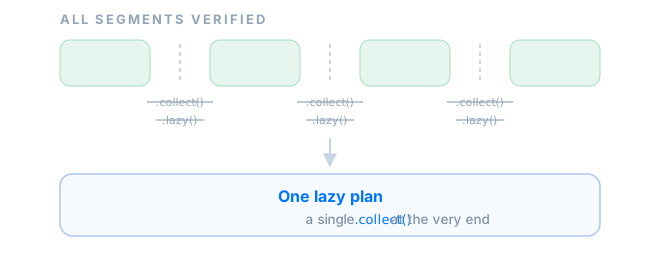
Working segment by segment means that at some point consecutive segments run on Polars.
The trailing .collect().to_pandas() on one side and the pl.from_pandas(...).lazy() on the other can be taken out. Instead, the segments can be chained together as LazyFrames, and a single .collect() remains at the very end.
This way the optimizer can make better choices about the work that is being done, potentially leading to better performance.
- Upside: one framework and one set of idioms in the pipeline, no boundary conversions to pay for, and a single lazy plan the optimizer can see from end to end.
- Downside: it’s more expensive than migrating a single section, because the work scales with the number of segments and each one needs verification before you can trust it.
- Recommended when: the pipeline has a cost, reliability, or maintenance problem that runs through all of it rather than sitting in one section, or you want a single DataFrame library in the pipeline rather than two. Doing the translation by hand puts every semantic decision through you, which leaves the team with the mental model of the new pipeline, and that’s worth paying for on critical processes.
An LLM can execute the migration, not judge the semantics
A model can execute the same segment-by-segment migration.
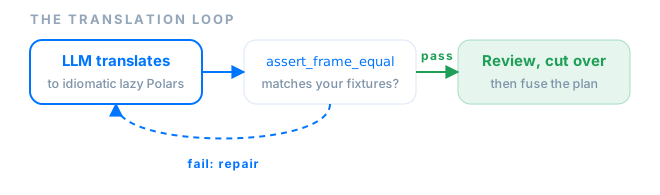
It translates routine code, proposes expression-based alternatives to imperative pandas patterns, and repairs its own mistakes by rerunning the assert_frame_equal check against your fixtures until it passes.
The cost of a full migration scales with the number of pipelines and segments you have to translate, and that cost is what an LLM changes.
The trade-off is that nobody on the team wrote the new code, so the mental model of it has to come from review instead.
The model also cannot decide whether a change in null handling, row order, or a business rule is acceptable.
That call stays yours, and the fixtures and assertions from the previous section are how you tell the model its proposed translation is correct.
Results depend on the handover, not the model choice
How effectively the LLM does the migration depends less on the model than on how you hand it the work. Four things that help:
- Make the fixtures the spec. The input and output pair you captured per segment is a check the model can run itself, without asking you what correct looks like. A segment without these fixtures will leave you unsure whether the translation is correct.
- Scope a prompt to one segment. Bounded input, bounded diff, and a check that either passes or doesn’t. Handing over a whole pipeline gives you a large diff with no clear place to start reviewing.
- Give it Polars-specific guidance. Models now often produce correct code, but some still make mistakes with the Polars API. Our previous post covers patterns that are sometimes incorrect and the guidance that fixes them.
- Let it run the repair loop unattended. When the model can execute
assert_frame_equaland fix its own failures, it will finish with code that passes the check.
Instead of having to rewrite the pipeline yourself, this leaves you reviewing the intent of the code rather than its syntax.
We recommend you pay attention to accidental Python loops, unnecessary materialization, or apply patterns carried over from pandas.
Polars expressions usually replace them; see the user-defined Python functions guide for the cases where a UDF is still the right tool.
The approach has precedent outside the DataFrame world: an Amazon Science study automatically validated 73% of functions when translating Go projects of up to 9,700 lines to Rust with equivalence checks.
- Upside: the same segment-by-segment full migration across many more pipelines, at a fraction of the manual cost.
- Downside: it can’t judge whether a semantic change is acceptable, so a passing check is not a substitute for review, the team’s knowledge of the new code comes from reading it rather than writing it, and setting up fixtures is work you have to do first.
- Recommended when: the translation work is routine and spread across more pipelines than you’d take on by hand, and you have fixtures per segment and the review capacity to keep the model honest.
Two decisions: how much to migrate, and who translates
First pick how much of the pipeline to touch. We’d recommend picking by the problem you can name: a measurable performance issue tends to point to converting one section, and a cost, reliability, or maintenance problem that runs through the whole pipeline makes a case for a full migration. In our experience the smallest change that solves the actual problem is a good place to start, and taking on more gets easier once the problem asks for it.
If it’s a full migration, the second choice is who does the translating.
Doing it by hand is slower per pipeline, but every semantic decision passes through the person making it: if nulls matter, if row order was incidental, if pandas behavior was unintended and not worth reproducing.
That is what you want for a critical process, where a changed row order or a NaN that should have been a null has consequences downstream, and it leaves the team able to reason about the pipeline afterwards.
With an LLM the fixtures and assertions carry the correctness burden and your attention shifts from writing the translation to reviewing its intent.
That’s a good trade for routine work at scale, and it brings pipelines into scope where the manual effort wouldn’t have been justified.
| Strategy | Upside | Downside | Recommended when |
|---|---|---|---|
| Migrate one performance-sensitive section | Quick, reversible, low risk | Two frameworks side by side; the optimizer can’t see across the boundary | A fast win on runtime performance without a full commitment |
| Full migration by hand | One framework, full-plan optimization, and every semantic decision reviewed as it’s made | The most expensive option per pipeline | A problem runs through the whole pipeline, or the process is critical enough to want the mental model that comes with it |
| Full migration with an LLM | The same migration across many more pipelines at a fraction of the cost | Can’t judge semantic changes, and knowledge of the new code comes from review | Routine translation at scale, with fixtures per segment and review capacity in place |
In the next post, Most of the Python data stack accepts Polars without a copy, we take a look at ecosystem support for Polars. We map which libraries keep data in Polars with zero copy, which ones convert through NumPy or pandas, and which ones require manual conversion because they don’t support Polars at all.
Footnotes
-
This post writes “pandas” in lowercase, even at the start of a sentence, per the project’s own request. ↩