Data teams often run Polars queries on a regular basis, such as data aggregations to store relevant information or generating metrics for dashboards. To orchestrate these queries, many teams turn to Apache Airflow.
Apache Airflow is an open-source platform to programmatically author, schedule, and monitor workflows. In this post, you’ll learn how to use the Polars Cloud SDK with Airflow to schedule and run Polars queries.
Polars Cloud is a managed data platform that enables you to run Polars queries remotely in your cloud, handling infrastructure and scaling automatically. It offers multiple scaling strategies including: horizontal, vertical, and diagonal, all through a single unified API. By using Polars’ OSS streaming engine on workers, it maintains the same performance characteristics you know from local Polars while providing the flexibility to choose the optimal compute strategy for your use case, whether that’s distributed processing or a single high performance node.
The goal is to keep your Airflow instance small, lightweight, and focused on orchestration. The heavy lifting is delegated to a Polars Cloud cluster that is provisioned specifically for your job.
This approach uses the orchestration capabilities of Airflow and prevents the hassle of maintaining a large, always-on cluster. It also aligns with the Polars philosophy of a Unified API: write your code once, run it anywhere.
By the end of this post, you’ll learn how to run every kind of Polars query, including parallel and multi-stage queries, with Airflow.
Setting Up an Airflow Connection with a Polars Cloud Service Account
In order to start Polars Cloud jobs from Airflow, you’ll need to set up a Service Account and configure an Airflow Connection.
First, you’ll need the credentials of a service account to connect to Polars Cloud. You can find how to create a Service Account in the User Guide.
Next, you can set the credentials for this service account in Airflow so that they’re available when orchestrating your queries.
The recommended way is to set the details using a Connection.
There are a couple of ways to set Connections.
To set it through the UI, you can go to the tab Admin > Connections > Click the button + Add Connection:
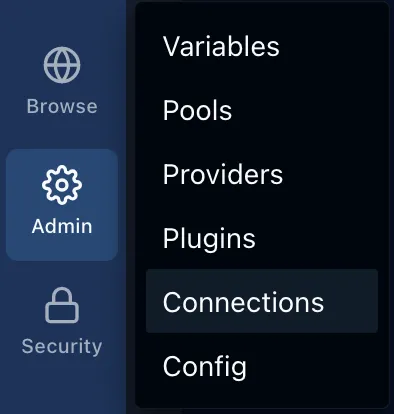
In the pop-up that opens, the Connection ID can be set to polars_cloud.
The Connection Type should be set to HTTP.
You can set the Client ID from the previous step in Login, and the Client Secret in Password.
Note that this will add the secrets to the Airflow database, which might not fit your security requirements.
They can also be stored in your favorite Secrets Backend.
Second, the Airflow environment needs the packages polars, for building and working with Polars queries, and polars-cloud for managing the connection to Polars Cloud.
These can be installed according to the Airflow recommendations.
This sets you up to connect to Polars Cloud and execute your queries remotely.
Executing a Single Query
Start by creating a DAG that will orchestrate the execution of a single query. This introduces the basic concepts used to orchestrate Polars Cloud.
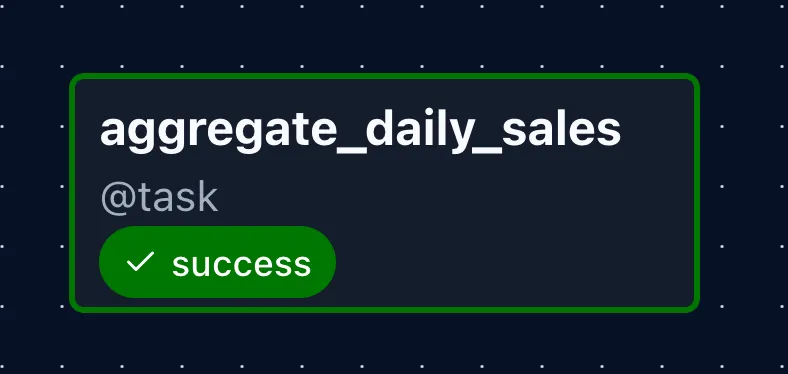
from datetime import datetime

import polars as pl
import polars_cloud as pc

from airflow.sdk import BaseHook, dag, task


@dag(start_date=datetime(2026, 1, 1), schedule="@daily")
def fire_and_forget_dag():
    @task()
    def aggregate_daily_sales():
        conn = BaseHook.get_connection("polars_cloud")
        pc.authenticate(client_id=conn.login, client_secret=conn.password)

        ctx = pc.ComputeContext(
            workspace="playground", cpus=8, memory=16, cluster_size=1
        )

        (
            pl.scan_parquet(
                "s3://polars-cloud-samples-us-east-2-prd/pdsh/sf100/lineitem/*.parquet",
                storage_options={"request_payer": "true"},
            )
            .group_by("l_linestatus")
            .agg(pl.count())
            .remote(ctx)
            .sink_parquet("s3://your-bucket/result-location/")
        )

    aggregate_daily_sales()


fire_and_forget_dag()
Here’s what each part does:
@dag(start_date=datetime(2026, 1, 1), schedule="@daily")
def fire_and_forget_dag():
With this decorator you indicate that the python function it is attached to defines the Directed Acyclic Graph (DAG) that will contain everything that runs.
It takes some arguments to define the schedule on which it will run.
In this case, it starts running from the 1st of January in 2026 on a daily schedule.
The ID of the graph will be the name of the function, in this case fire_and_forget_dag.
@task()
def aggregate_daily_sales():
A DAG consists of tasks, which are the basic execution units in Airflow. You decorate a python function that defines the task that will be run.
conn = BaseHook.get_connection("polars_cloud")
pc.authenticate(client_id=conn.login, client_secret=conn.password)
Before you can communicate with Polars Cloud, you need to authenticate.
You can retrieve the connection details you set up in Airflow with the BaseHook.
After that you can use the polars_cloud client to authenticate.
ctx = pc.ComputeContext(
    workspace="playground", cpus=8, memory=16, cluster_size=1
)
Before you run the query, you need to define in what compute context it will run.
A ComputeContext defines the hardware configuration for your query.
You can specify CPU, memory, or specific instance type, and cluster size (single node or distributed). Learn more about compute contexts.
Here you connect to the "playground" workspace of your account.
In that workspace you’ll make a compute cluster of just 1 machine with 8 vCPUs and 16GB of RAM.
With everything set-up and authenticated, you can go ahead and send a query to the compute cluster.
(
    pl.scan_parquet(
        "s3://polars-cloud-samples-us-east-2-prd/pdsh/sf100/lineitem/*.parquet",
        storage_options={"request_payer": "true"},
    )
    .group_by("l_linestatus")
    .agg(pl.count())
    .remote(ctx)
    .sink_parquet("s3://your-bucket/result-location/")
)
This creates a Polars query using the Lazy API. When executing in lazy mode, a query graph is first constructed without executing it.
In this query you scan a file from the PDS-H benchmark and perform a count aggregation on the groups of l_linestatus.
After the query you don’t apply .collect() like you normally would.
This would execute the query on the Airflow runner, which is something you want to avoid.
Instead you want to send it to the larger compute cluster.
You can do this by calling .remote(ctx) instead, where ctx is the compute ontext you defined earlier.
When running queries on a remote cluster, the benefit is that the machine you’re running the query from can stay small, and you can use bigger machines on-demand only when you need the compute power.
You’ve indicated that this query should be run remotely, but you should still indicate how.
These are some of the functions that can be chained to .remote(ctx):
.sink_parquet(): Write the result of the query to the provided directory. The file will be a multi-part parquet file, so that the distributed runtime doesn’t have to sync everything to one file. This does not wait for the query to finish..show(): Run the query, wait for it to finish, and show the head of the result in the logs. Practical for debugging..execute(): Execute alone returns aDirectQueryorProxyQueryobject (depending on the execution mode of the compute context, which isdirectby default). Through this object you can retrieve query status, a profile of the query, or wait for the results..execute().await_result(): Runs the query and waits for the result. This returns aQueryResultobject which contains information about the result, such as the first 10 rows, the status of the query, and, if it finished, the location where results are stored..execute().get_status(): Gets the current status of the query, returns aQueryStatusobject, which can be queued, scheduled, in progress, success, failed, or canceled.
With sink_parquet() you tell the compute to write final results to the defined location, once it finishes.
This operation is non-blocking, so after starting the query this method already returns, allowing the task to shut down.
After finishing the query, the cluster will shut down after the defined idle timeout.
The default is one hour, but it can be set to a minimum of 10 minutes by providing the ComputeContext with idle_timeout_mins = 10.
    aggregate_daily_sales()

fire_and_forget_dag()
At the bottom of the script you define the task dependencies, but since you only have one task in this DAG, you only call that one. In later sections you’ll see the dependency definition in action.
After defining task dependencies in the DAG function, you call the DAG in the outer scope.
This minimal pattern allows you to kick off a query and free up the Airflow worker immediately as soon as the query is executing.
Single Query with Status Report
If you want to make sure it finishes successfully, you can change the task to the following:
@task()
def aggregate_daily_sales():
    # ... authentication and ComputeContext setup ...

    query = (
        pl.scan_parquet(...)
        .group_by("l_linestatus")
        .agg(pl.count())
        .remote(ctx)
        .sink_parquet("s3://your-bucket/result-location/")
    )

    query.await_result()
    if query.get_status() != pc.QueryStatus.SUCCESS:
        raise ValueError("Query failed")
Here you save the query into a variable that you can use afterwards to check the status once it has finished.
query.await_result()
if query.get_status() != pc.QueryStatus.SUCCESS:
    raise ValueError("Query failed")
The method .await_result() blocks the thread and polls the cluster to wait for the query to finish.
Afterwards you can retrieve the status and throw an error if the query wasn’t successful.
This will mark the task as failed in Airflow, and bring failures to your attention quickly.
Immediate Cluster Shutdown with a Context Wrapper
One advantage of waiting for the query to finish is that you can also shut down the cluster immediately after.
This can be done by applying the ComputeContext as a context wrapper:
@task()
def aggregate_daily_sales():
    # ... authentication ...

    with pc.ComputeContext(
        workspace="playground", cpus=8, memory=16, cluster_size=1
    ) as ctx:
        query = (
            pl.scan_parquet(...)
            .group_by("l_linestatus")
            .agg(pl.count())
            .remote(ctx)
            .sink_parquet("s3://your-bucket/result-location/")
        )

        query.await_result()
        if query.get_status() != pc.QueryStatus.SUCCESS:
            raise ValueError("Query failed")
In this code you can see the following:
with pc.ComputeContext(
    workspace="playground", cpus=8, memory=16, cluster_size=1
) as ctx:
The ComputeContext is being used as a context wrapper.
This means the compute will be started before your code, and shut down after the scope is exited.
Note that a shutdown always occurs, regardless of queries running on the compute.
If you apply this pattern and run .execute() in your query, the compute will be shut down without finishing queries.
Creating Re-Usable Clusters with Manifests
So far you have used ad-hoc clusters. These are initiated and torn down for separate queries. However, Polars Cloud also offers the possibility to create a pre-defined named cluster. These are called manifests.
Using a manifest has a couple of advantages:
- No need to think about cpus, memory, or instance types. This is only defined upon its creation.
- You only have to reference a manifest name, combined with the workspace, to initiate the compute context.
- When multiple people are querying the cluster, and it is not shut down in between, it saves the overhead of starting and stopping a cluster.
- Queries using the entire cluster will be queued, or can be run in parallel if they only use single workers.
You can create a manifest in the interface by going to the compute dashboard and selecting the “Manifests” tab:
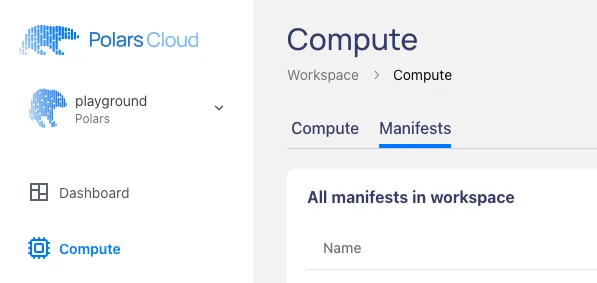
By clicking on + Add new manifest at the bottom you’ll get a pop-up in which you can create a manifest to your liking.
You can select the cluster size, the instance type, python version, and even additional external dependencies that should be available on the workers.
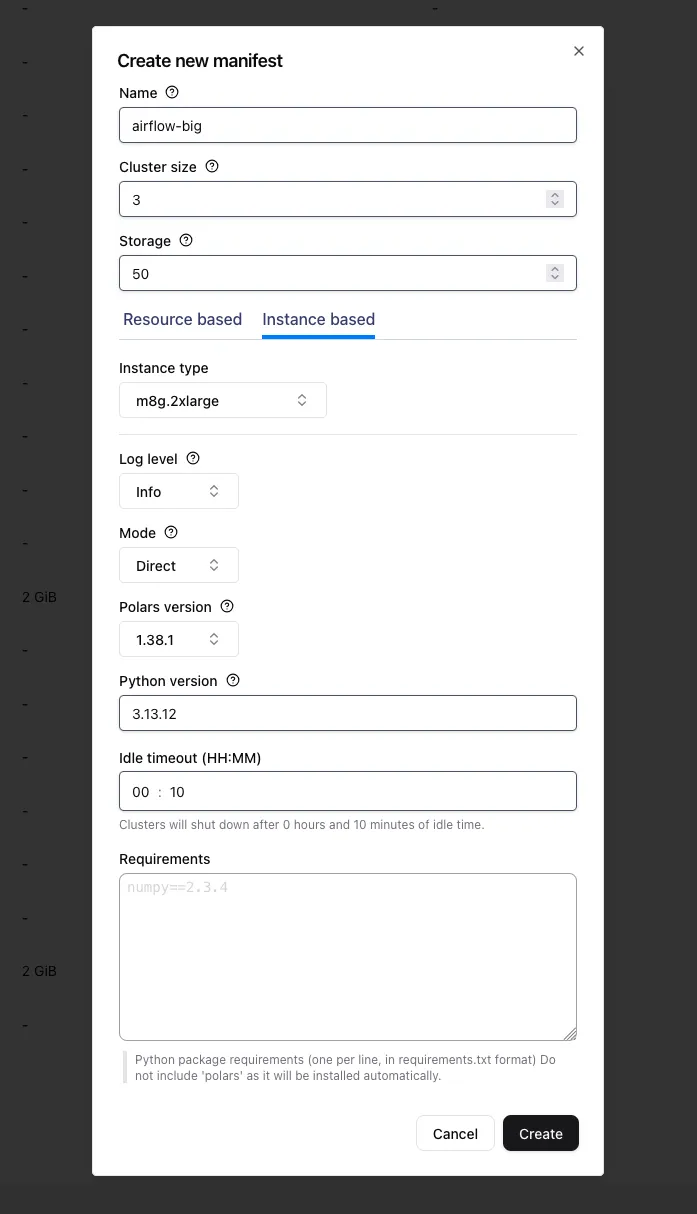
A cluster can also be created by programmatically creating a ComputeContext and calling .register("name"):
pc.ComputeContext(
    workspace="playground", cpus=8, memory=16, cluster_size=3
).register("airflow-big")
After this you can easily recreate, or if it is already started even reconnect, to “airflow-big” like so:
pc.ComputeContext(workspace="playground", name="airflow-big")When you’re using the same manifest with multiple users you can optimally use your resources, preventing the overhead of starting and stopping the cluster. Queries will be queued, or can even run in parallel when marked as single node queries.
If the manifest doesn’t exist, the query will fail to run.
Easy Authentication with a Python Decorator
When you’ve got multiple tasks in your DAG, every one will need to authenticate, because they all run in a new process. Instead of repeating the authentication code in every task, you can turn the authentication into a decorator, which automatically authenticates the function it wraps:
from functools import wraps


def authenticate(fn):
    """Authenticates to Polars Cloud before it runs the function that it receives"""

    @wraps(fn)
    def authenticated_fn(*args, **kwargs):
        conn = BaseHook.get_connection("polars_cloud")
        pc.authenticate(client_id=conn.login, client_secret=conn.password)
        return fn(*args, **kwargs)

    return authenticated_fn
You can then add @authenticate to the tasks to run the authentication code before the task code runs:
@dag(schedule="@daily", start_date=datetime(2026, 1, 1), catchup=False)
def parallel_dag():
    @task()
    @authenticate
    def query_1():
        query()

    @task()
    @authenticate
    def query_2():
        query()
This way of decorating the tasks with an authentication decorator deduplicates your code. You’ll see it in action in the next section.
Parallel Query Execution
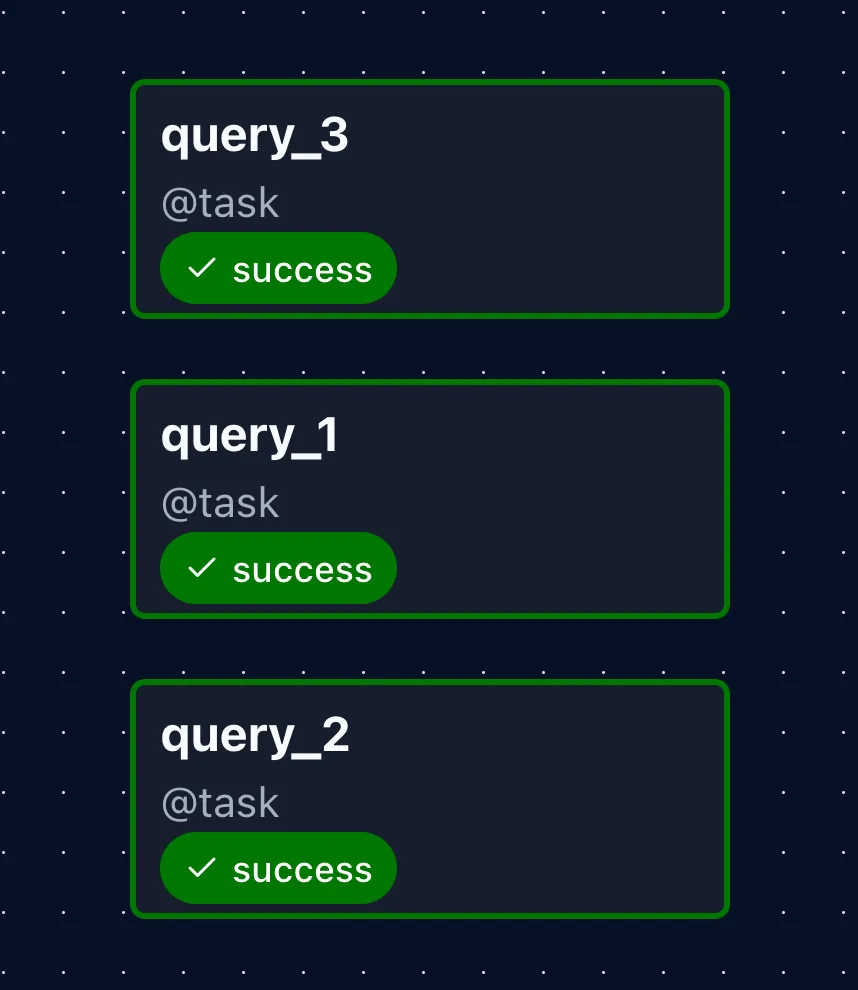
Using the manifest and authentication decorator from the previous sections, you can run jobs in parallel. For simplicity, code fragments shown earlier in the post and the specific Polars queries are left out.
import...
def authenticate(fn):
    ...


WORKSPACE = "playground"
MANIFEST_NAME = "airflow-big"

@dag(schedule="@daily", start_date=datetime(2026, 1, 1), catchup=False)
def parallel_dag():
    @task()
    @authenticate
    def query_1():
        ctx = pc.ComputeContext(workspace=WORKSPACE, name=MANIFEST_NAME)
        (
            my_query
            .remote(ctx)
            .single_node()
            .sink_parquet("s3://your-bucket/result-1-location/")
        )

    @task()
    @authenticate
    def query_2():
        ...  # Comparable to query_1

    @task()
    @authenticate
    def query_3():
        ...  # Comparable to query_1

    query_1()
    query_2()
    query_3()


parallel_dag()
To let queries run in parallel on the same cluster, you can mark them as single_node() after the remote() call.
This lets Polars Cloud know they can run on a single worker, and allows for running multiple queries concurrently on the same multi-node cluster.
By default queries are run using remote(ctx).distributed()... to make full use of the available compute.
However, this prevents them from running in parallel because the scheduler queues other distributed queries.
If you want parallel execution, the queries have to be marked with .single_node().
Multiple Stages
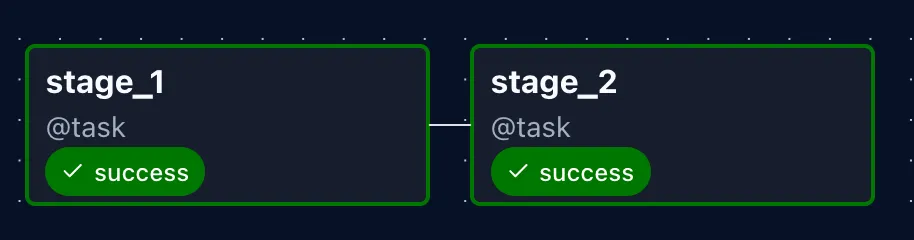
In Airflow every task runs in its own process. This requires any data shared between tasks to be serializable. The easiest way to do this is to make use of Polars Cloud temporary result storage. Results are stored for a short while (a couple of hours), and the location of the stored results can be passed on to other tasks.
@dag(schedule="@daily", start_date=datetime(2026, 1, 1))
def multistage_pipeline():
    @task()
    @authenticate
    def stage_1() -> list[str]:
        ctx = pc.ComputeContext(workspace=WORKSPACE, name=MANIFEST_NAME)
        query_result = (
            stage_1_query
            .remote(ctx)
            .execute()
            .await_result()
        )
        if query_result.location is None:
            raise ValueError("Query result location is None")
        return query_result.location

    @task()
    @authenticate
    def stage_2(result_locations: list[str]):
        lf = pl.scan_parquet(result_locations)
        ctx = pc.ComputeContext(workspace=WORKSPACE, name=MANIFEST_NAME)
        (
            lf.with_columns(...)
            .remote(ctx)
            .show()
        )

    stage_1_result_locations = stage_1()
    stage_2(stage_1_result_locations)

multistage_pipeline()
The task in the first stage returns a list of strings, containing the locations of the parquet files that are saved as intermediate results.
These will be serialized and passed on to the second stage.
There you can scan the locations with pl.scan_parquet() and do other transformations on them.
Manual Immediate Cluster Shutdown
Instead of letting the cluster run idle until the timeout strikes, you can shut down the cluster manually immediately after all tasks have finished. This can be done by adding a task with a special trigger:
@task(trigger_rule=TriggerRule.ALL_DONE)
@authenticate
def cluster_shutdown():
    ctx = pc.ComputeContext(workspace=WORKSPACE, name=MANIFEST_NAME)
    ctx.stop()

[task1, task2, task3, ...] >> cluster_shutdown()
The cluster_shutdown task is set to be triggered after all upstream tasks are done (whether they failed or succeeded).
This makes sure the cluster is shut down immediately after the rest of the tasks have finished running.
At the bottom you define the dependencies of the tasks.
In this way cluster_shutdown runs after all tasks have run.
Putting It All Together
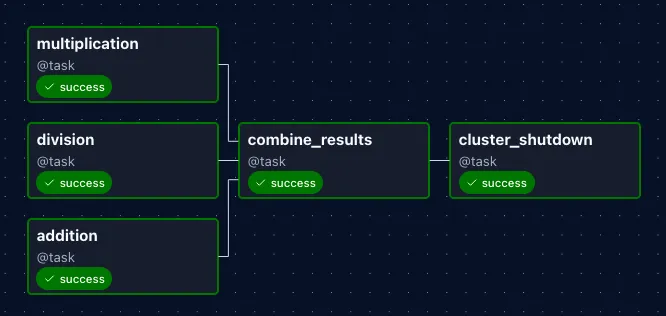
Below is a complete, runnable example that combines all patterns from the previous sections.
It uses the following elements:
- Authentication function as wrapper.
- Running queries on the same cluster using a named manifest.
- Parallel queries on the same compute cluster using
.single_node(). - Passing results to following stages using task dependencies.
- Manual immediate cluster shutdown once all queries have finished.
from datetime import datetime
from functools import wraps

import polars as pl
import polars_cloud as pc

from airflow.sdk import BaseHook, TriggerRule, dag, task


def authenticate(fn):
    """Authenticates to Polars Cloud before it runs the function that it receives"""

    @wraps(fn)
    def authenticated_fn(*args, **kwargs):
        conn = BaseHook.get_connection("polars_cloud")
        pc.authenticate(client_id=conn.login, client_secret=conn.password)
        return fn(*args, **kwargs)

    return authenticated_fn


WORKSPACE = "playground"
MANIFEST_NAME = "airflow-big"

multiplication_query = pl.LazyFrame({"id": [1, 2, 3], "value_a": [10, 20, 30]})
division_query = pl.LazyFrame({"id": [1, 2, 3], "value_b": [100, 200, 300]})
addition_query = pl.LazyFrame({"id": [1, 2, 3], "value_c": [5, 15, 25]})


@dag(schedule="@daily", start_date=datetime(2026, 1, 1))
def multistage_pipeline():
    @task()
    @authenticate
    def multiplication() -> list[str]:
        ctx = pc.ComputeContext(workspace=WORKSPACE, name=MANIFEST_NAME)
        query_result = (
            multiplication_query.with_columns(pl.col("value_a") * 2)
            .remote(ctx)
            .single_node()
            .execute()
            .await_result()
        )
        if query_result.location is None:
            raise ValueError("Query result location is None")
        return query_result.location

    @task()
    @authenticate
    def division() -> list[str]:
        ctx = pc.ComputeContext(workspace=WORKSPACE, name=MANIFEST_NAME)
        query_result = (
            division_query.with_columns(pl.col("value_b") / 10)
            .remote(ctx)
            .single_node()
            .execute()
            .await_result()
        )
        if query_result.location is None:
            raise ValueError("Query result location is None")
        return query_result.location

    @task()
    @authenticate
    def addition() -> list[str]:
        ctx = pc.ComputeContext(workspace=WORKSPACE, name=MANIFEST_NAME)
        query_result = (
            addition_query.with_columns(pl.col("value_c") + 5)
            .remote(ctx)
            .single_node()
            .execute()
            .await_result()
        )
        if query_result.location is None:
            raise ValueError("Query result location is None")
        return query_result.location

    @task()
    @authenticate
    def combine_results(
        result_locations_query_1: list[str],
        result_locations_query_2: list[str],
        result_locations_query_3: list[str],
    ):
        lf_1 = pl.scan_parquet(result_locations_query_1)
        lf_2 = pl.scan_parquet(result_locations_query_2)
        lf_3 = pl.scan_parquet(result_locations_query_3)
        ctx = pc.ComputeContext(workspace=WORKSPACE, name=MANIFEST_NAME)
        print(
            lf_1.join(lf_2, on="id")
            .join(lf_3, on="id")
            .with_columns(
                (pl.col("value_a") + pl.col("value_b") + pl.col("value_c")).alias(
                    "total"
                )
            )
            .remote(ctx)
            .distributed()
            .show()
        )

    @task(trigger_rule=TriggerRule.ALL_DONE)
    @authenticate
    def cluster_shutdown():
        ctx = pc.ComputeContext(workspace=WORKSPACE, name=MANIFEST_NAME)
        ctx.stop()

    multiplication_results = multiplication()
    division_results = division()
    addition_results = addition()
    final = combine_results(multiplication_results, division_results, addition_results)
    final >> cluster_shutdown()


multistage_pipeline()
This will run all the queries on Polars Cloud. In the logging of the tasks you can find a link to the compute dashboard where you can follow the status of the queries:
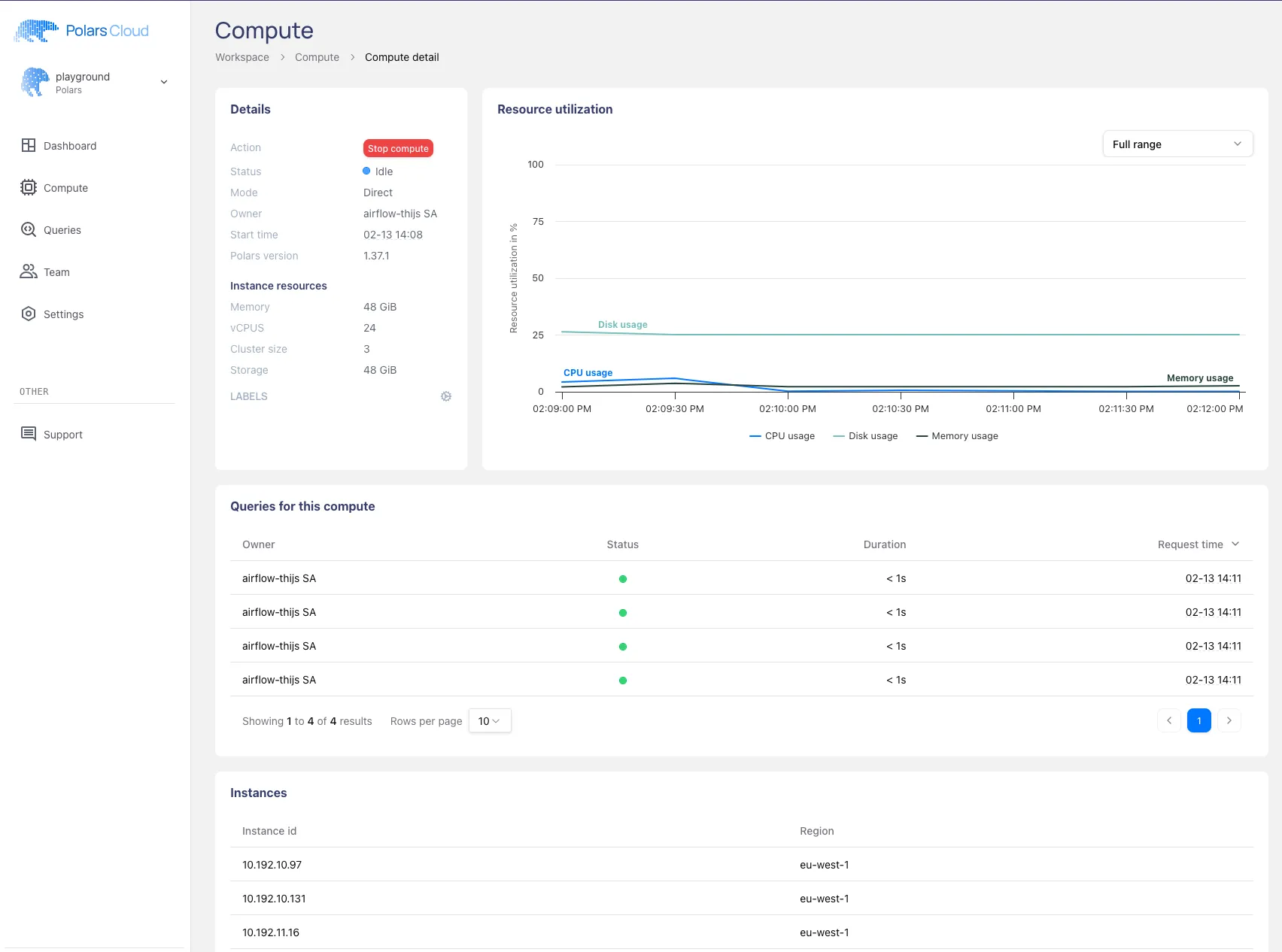
Note that the resource usage in the plot is low because the queries we executed are small examples. If you put the cluster to work it will show in the graph.
From this dashboard it will soon be possible to dive deeper into a query profiler, which will give you realtime status and statistics of how the query is performing. Follow us on LinkedIn and keep an eye out for the news on this new feature.
Conclusion
This post covered the main patterns for orchestrating Polars Cloud queries with Airflow:
- Fire-and-forget for jobs that don’t need monitoring from Airflow.
- Awaiting results with status checks when you need failure visibility.
- Context wrappers for immediate cluster shutdown after a query completes.
- Named manifests for reusing a pre-defined cluster across tasks and users.
- Parallel execution with
.single_node()to run concurrent queries on the same cluster. - Multi-stage pipelines by passing intermediate result locations between tasks.
- Manual shutdown to avoid idle compute costs.
These patterns can be mixed and matched depending on your workload. The Airflow instance stays lightweight and handles only orchestration, while the actual compute happens on Polars Cloud.
For more details on the Polars Cloud SDK, see the documentation.